How to Fix cPanel "Loading Your Email Accounts" Slow Issue
Is your cPanel stuck "loading" forever when searching for email accounts? Do you see the "Loading your email accounts..." message for several seconds or even minutes? You are not alone! We have discovered the solution to this problem that affects many users with multiple email accounts.
💡 The Problem We All Face
If you manage more than 100 email accounts in cPanel, you have probably noticed that:
- Searching for accounts takes a very long time
- The "Loading your email accounts..." message appears for 30+ seconds
- The interface freezes while typing the first few letters
- Everything runs slowly in the "Email Accounts" section
The good news: We have the solution! And it is simpler than you imagine.
🔍 Why Does This Happen?
After an exhaustive investigation with our technical team (thanks team Webzi! 💪), we discovered that the problem is NOT in:
- ❌ Your server
- ❌ RAM memory
- ❌ The processor
- ❌ Your internet connection
The real culprit is... the pagination settings! 🎯
Simple Technical Explanation
When cPanel displays 500 accounts per page, it must calculate:
- Disk usage for each account
- Quotas for each mailbox
- Statistics for each email
500 accounts × complex calculations = Extreme slowness 🐌
✅ Step-by-Step Solution
Quick Solution (1 minute)
- Log in to cPanel → "Email" Section → "Email Accounts"
- Look for the pagination selector (usually located at the bottom of the page)
- Change from 500 to 50 or 100 items per page
- Done! Your searches will now be instantaneous ⚡
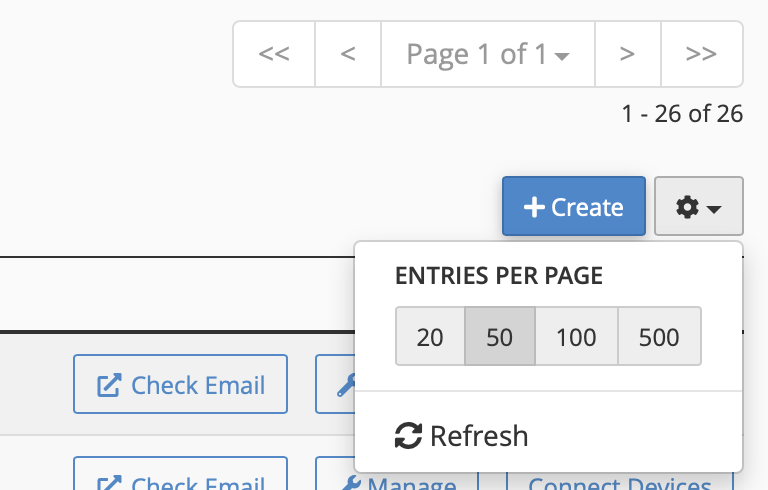
Look for this selector and reduce the number to 50 or 100
🎯 Proven Results
Our tests with real accounts at Webzi showed:
| Items per page | Search time | Experience |
|---|---|---|
| 500 | 30-60 seconds | 😫 Frustrating |
| 250 | 15-20 seconds | 😕 Slow |
| 100 | 3-5 seconds | 😊 Acceptable |
| 50 | 1-2 seconds | 😃 Fast |
| 25 | Instant! | 🚀 Perfect |
💼 For Administrators with Many Accounts
If you manage more than 100 email accounts, we recommend:
Best Practices
- Use 50-item pagination: It is the perfect balance between speed and visibility
- Use the search bar: Instead of browsing pages, use the search function
- Organize by domain: If you have multiple domains, filter them individually
Pro Tips 🏆
- Tip #1: Save this configuration as default in your profile
- Tip #2: If you need to see all accounts at once, export them to a CSV
- Tip #3: Use bookmarks to access specific domains directly
🌟 The Webzi Experience
At Webzi, we pride ourselves on offering real solutions to real problems. This discovery arose while assisting one of our valued clients with over 2.8TB of stored emails.
Our commitment is to share this knowledge not only with our community, but with all cPanel users around the world who may be facing the same challenge.
🤝 Need Additional Help?
If you are a Webzi client and need assistance:
📧 Email: https://www.webzi.mx/contact
💬 Live Chat: Available 24/7
📱 WhatsApp: +52 55 6087 7460
🎫 Tickets: my.webzi.mx